CMA:Slack 数据分析机器人
在 Slack 中 @机器人 获取数据分析报告
🌐 查看英文原文 | 源码 Notebook
使用 Claude Managed Agents 构建 Slack 数据分析机器人
简介
你将用 Bolt for Python(Slack 的官方应用构建框架)构建的 Slack 机器人来包装 data_analyst_agent.ipynb 中的 Agent。@提及机器人并附带一个 CSV 问题,即可获得发布到线程中的叙述性报告。后续消息继续同一个 session。
user: @databot what's driving Q1 revenue?  [sales.csv]
    │
    ▼
bot uploads the CSV and starts an agent session
    │
    ▼
bot streams the agent's progress back to the thread
    │
    ▼
bot posts the finished report to the thread
你将学到什么
- 从 Slack @提及启动 Agent 运行
- 以线程更新显示 Agent 的进度
- 将完成的报告发布回线程
- 通过后续回复保持对话继续
前提条件
运行下面的安装单元格。
创建一个 Slack 应用:选择 Create New App → From a manifest,粘贴
slack_app_manifest.yaml,并将其安装到你的工作空间。清单启用了 Socket Mode(Slack 通过 WebSocket 传递事件,因此你不需要公共 URL)和所需的范围。然后获取两个 token:- OAuth & Permissions → 复制 Bot User OAuth Token(
xoxb-...) - Basic Information → App-Level Tokens → 生成一个范围为
connections:write的 token(xapp-...)
在你想要机器人的频道中,运行
/invite @databot。- OAuth & Permissions → 复制 Bot User OAuth Token(
运行
data_analyst_agent.ipynb,它会将ANALYST_ENV_ID、ANALYST_AGENT_ID和ANALYST_AGENT_VERSION保存到.env。
下面的设置单元格会提示你输入 Slack token 并将它们保存到 .env,这样你就不必在重启时重新输入(或者事先将它们添加到 .env 以跳过提示)。.env 已经在 .gitignore 中——永远不要提交到版本控制。如果你手边没有 Slack 工作空间,你仍然可以通读代码——每个部分都解释了它的作用——但你需要一个来运行机器人。
%%capture
%pip install -q "anthropic>=0.91.0" python-dotenv slack_bolt requests markdown-to-mrkdwn
import io
import os
import threading
from getpass import getpass
import requests
from anthropic import Anthropic
from dotenv import load_dotenv, set_key
from markdown_to_mrkdwn import SlackMarkdownConverter
from slack_bolt import App
from slack_bolt.adapter.socket_mode import SocketModeHandler
load_dotenv(override=True)
# Prompt for Slack tokens on first run and save them to .env.
for key in ("SLACK_BOT_TOKEN", "SLACK_APP_TOKEN"):
if not os.environ.get(key):
os.environ[key] = getpass(f"{key}: ")
set_key(".env", key, os.environ[key])
client = Anthropic()
app = App(token=os.environ["SLACK_BOT_TOKEN"])
for key in ("ANALYST_ENV_ID", "ANALYST_AGENT_ID", "ANALYST_AGENT_VERSION"):
if not os.environ.get(key):
raise RuntimeError(f"{key} not set. Run data_analyst_agent.ipynb first.")
# Set these from the IDs saved by the data analyst notebook. Reusing
# the agent and environment avoids re-provisioning on every bot restart.
ANALYST_AGENT = {
"id": os.environ["ANALYST_AGENT_ID"],
"version": int(os.environ["ANALYST_AGENT_VERSION"]),
}
ANALYST_ENV_ID = os.environ["ANALYST_ENV_ID"]
# thread_ts -> session_id, so follow-ups land in the same session.
# Sessions stay open for replies. In production, persist this and
# archive sessions when threads go stale.
thread_sessions: dict[str, str] = {}
mrkdwn = SlackMarkdownConverter()1. 在机器人被提及时启动 session
Bolt 将一个 ack 回调传递给每个处理器;调用它告诉 Slack 事件已收到。Slack 会在三秒内重试任何未确认的内容,因此 on_mention 立即调用 ack() 并将慢工作(文件上传、session 创建、流式传输)交给后台线程上的 start_analysis。
每次提及都会创建一个 session,你可以在 Console 的 Sessions 下打开它来观看完整的追踪。
@app.event("app_mention")
def on_mention(event, say, ack):
    ack()
    channel = event["channel"]
    thread_ts = event.get("thread_ts") or event["ts"]
    # Mention text arrives as "<@BOTID> question"; drop the mention prefix.
    question = event["text"].split(">", 1)[-1].strip()
    slack_file = (event.get("files") or [None])[0]

    say(text="On it. Analyzing now.", thread_ts=thread_ts)
    # Run the slow work in a background thread so this handler
    # returns within Slack's 3s limit.
    threading.Thread(target=start_analysis, args=(channel, thread_ts, question, slack_file)).start()


def start_analysis(channel: str, thread_ts: str, question: str, slack_file: dict | None) -> None:
    try:
        # If the mention had a file attached, pull it from Slack and
        # re-upload to the Anthropic Files API so the session can mount it.
        resources = []
        if slack_file:
            resp = requests.get(
                slack_file["url_private"],
                headers={"Authorization": f"Bearer {app.client.token}"},
                timeout=30,
            )
            resp.raise_for_status()
            mime = slack_file.get("mimetype", "text/csv")
            uploaded = client.beta.files.upload(
                file=(slack_file["name"], io.BytesIO(resp.content), mime)
            )
            mount = "/mnt/session/uploads/data.csv"
            resources.append({"type": "file", "file_id": uploaded.id, "mount_path": mount})
            question += f"\n\nThe data is mounted at {mount}."

        # One session per Slack thread. Store the thread coordinates in
        # metadata so anyone reading the event stream knows where to reply.
        session = client.beta.sessions.create(
            environment_id=ANALYST_ENV_ID,
            agent={"type": "agent", **ANALYST_AGENT},
            resources=resources,
            # Titles are capped at 80 chars and can't contain Unicode
            # control/format characters (Slack sometimes inserts them).
            title="".join(c for c in question if c.isprintable())[:80],
            metadata={"slack_channel": channel, "slack_thread_ts": thread_ts},
        )
        thread_sessions[thread_ts] = session.id

        # Send the question as a user.message event. The agent starts
        # working immediately; relay_stream posts its progress to the thread.
        client.beta.sessions.events.send(
            session.id,
            events=[{"type": "user.message", "content": [{"type": "text", "text": question}]}],
        )
        relay_stream(session.id, channel, thread_ts)
    except Exception as e:
        app.client.chat_postMessage(
            channel=channel, thread_ts=thread_ts, text=f"Analysis failed: {type(e).__name__}: {e}"
        )
2. 将进度和结果中继到线程
下面定义的 relay_stream 函数是两个 API 之间的桥梁:它从 Anthropic session 事件流中读取并发布到 Slack。它循环直到 Agent 变为空闲,然后发布最终摘要并上传 Agent 写入的任何文件。
files.list(scope_id=...) 返回 session 中的每个文件——包括我们上传的 CSV 和 Agent 写入的任何内容。我们过滤到 downloadable == True,以便只有 Agent 生成的输出(报告、图表)被发布回 Slack,而不是用户自己的输入。
def relay_stream(session_id: str, channel: str, thread_ts: str) -> None:
    summary = ""
    posted_progress = False
    for ev in client.beta.sessions.events.stream(session_id):
        t = ev.type
        if t == "agent.message":
            # Keep the latest text block; it becomes the final summary.
            for b in ev.content:
                if b.type == "text" and b.text.strip():
                    summary = b.text
        elif t == "agent.tool_use" and not posted_progress:
            # Post a one-time progress update when the agent starts
            # running commands.
            app.client.chat_postMessage(
                channel=channel, thread_ts=thread_ts, text="Running analysis..."
            )
            posted_progress = True
        elif t == "session.status_idle":
            break
        elif t == "session.status_terminated":
            trace = f"https://platform.claude.com/sessions/{session_id}"
            app.client.chat_postMessage(
                channel=channel,
                thread_ts=thread_ts,
                text=f"Session terminated unexpectedly. Trace: {trace}",
            )
            return

    # Turn is done. Post the summary, then upload any generated files.
    if summary:
        text = mrkdwn.convert(summary)
        if len(text) > 3900:  # Slack text limit ~4000 chars
            text = text[:3900] + "\n_(truncated)_"
        app.client.chat_postMessage(channel=channel, thread_ts=thread_ts, text=text)
    outputs = client.beta.files.list(scope_id=session_id, betas=["managed-agents-2026-04-01"])
    for f in outputs.data:
        if not f.downloadable:
            continue
        content = client.beta.files.download(f.id).read()
        app.client.files_upload_v2(
            channel=channel, thread_ts=thread_ts, filename=f.filename, content=content
        )
3. 在同一个 session 中处理后续消息
线程中的回复成为现有 session 中的另一轮——你不需要再次 @mention 机器人。容器文件系统和对话历史在轮次之间持久化。
def continue_session(session_id: str, channel: str, thread_ts: str, text: str) -> None:
    try:
        client.beta.sessions.events.send(
            session_id,
            events=[{"type": "user.message", "content": [{"type": "text", "text": text}]}],
        )
        relay_stream(session_id, channel, thread_ts)
    except Exception as e:
        app.client.chat_postMessage(
            channel=channel, thread_ts=thread_ts, text=f"Analysis failed: {type(e).__name__}: {e}"
        )


@app.event("message")
def on_thread_reply(event, ack):
    ack()
    thread_ts = event.get("thread_ts")
    # Only handle human replies in a thread where we already started
    # a session. Skip edits/deletes and other message subtypes.
    if event.get("subtype"):
        return
    if not thread_ts or event.get("bot_id") or thread_ts not in thread_sessions:
        return
    threading.Thread(
        target=continue_session,
        args=(thread_sessions[thread_ts], event["channel"], thread_ts, event["text"]),
    ).start()
4. 运行机器人
下面的单元格连接到 Slack 并开始监听。它在机器人运行时阻塞——完成后用 ■ 中断按钮停止它。
在机器人所在的任何频道中,附带 CSV 提及它。它会在线程中发布进度,然后是摘要和 report.html:
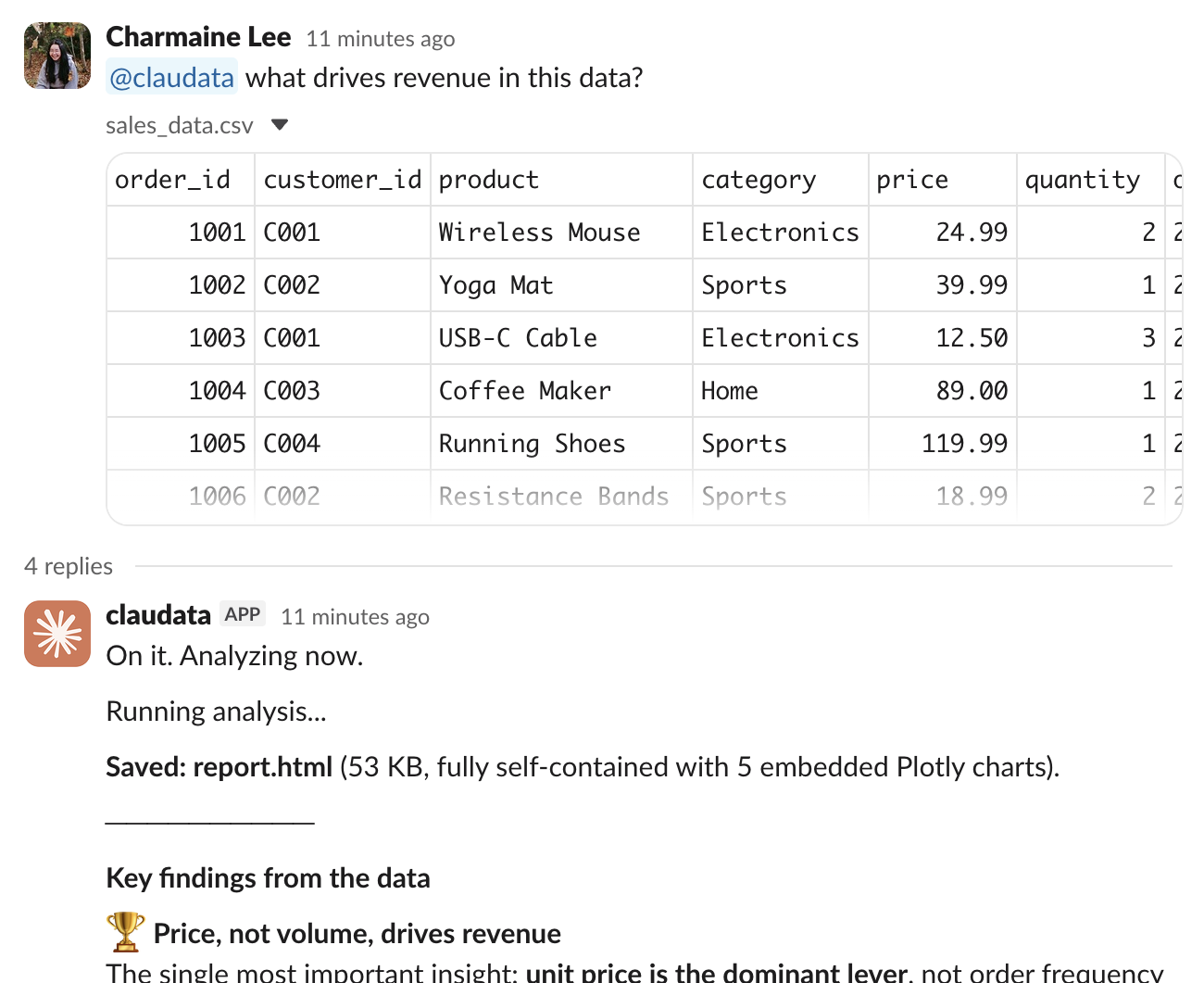
在线程中回复以深入分析相同的数据。
SocketModeHandler(app, os.environ["SLACK_APP_TOKEN"]).start()后续步骤
你已经将分析 Agent 包装在 Slack 机器人中:提及启动 session,事件流将进度中继到线程,输出被上传,回复继续相同的对话。
- 在
data_analyst_agent.ipynb中交换 Agent 的系统提示以更改其分析风格。重新运行该 notebook 会创建一个新 agent 并将其 ID 保存到.env供机器人获取。 - 将
thread_sessions持久化到数据库,使对话在机器人重启后存活。 - 将机器人移出此 notebook:将代码复制到
.py文件并将其部署到任何可以保持长期 WebSocket 连接的地方。
中文读者提示:本章节的代码和输出为英文原文。如需理解具体实现细节,可参考上方中文导读和代码注释。如有疑问,欢迎在 GitHub Issues 讨论。