!pip install llama-index
!pip install llama-index-multi-modal-llms-anthropic
!pip install llama-index-embeddings-huggingface
!pip install llama-index-vector-stores-qdrant
!pip install matplotlibMulti-Modal
In this notebook, we show how to use Anthropic MultiModal LLM class/abstraction for image understanding/reasoning.
Installation
Setup API key
import os

os.environ["ANTHROPIC_API_KEY"] = "YOUR Claude API KEY"
Download Sample Images
!wget 'https://raw.githubusercontent.com/run-llama/llama_index/main/docs/examples/data/images/prometheus_paper_card.png' -O 'prometheus_paper_card.png'
!wget 'https://raw.githubusercontent.com/run-llama/llama_index/main/docs/examples/data/images/ark_email_sample.PNG' -O 'ark_email_sample.png'
--2024-03-08 11:53:40-- https://raw.githubusercontent.com/run-llama/llama_index/main/docs/examples/data/images/prometheus_paper_card.png
Resolving raw.githubusercontent.com (raw.githubusercontent.com)... 185.199.110.133, 185.199.111.133, 185.199.109.133, ...
Connecting to raw.githubusercontent.com (raw.githubusercontent.com)|185.199.110.133|:443... connected.
HTTP request sent, awaiting response... 200 OK
Length: 1002436 (979K) [image/png]
Saving to: ‘prometheus_paper_card.png’
prometheus_paper_ca 100%[===================>] 978.94K --.-KB/s in 0.005s
2024-03-08 11:53:40 (175 MB/s) - ‘prometheus_paper_card.png’ saved [1002436/1002436]
--2024-03-08 11:53:40-- https://raw.githubusercontent.com/run-llama/llama_index/main/docs/examples/data/images/ark_email_sample.PNG
Resolving raw.githubusercontent.com (raw.githubusercontent.com)... 185.199.110.133, 185.199.111.133, 185.199.109.133, ...
Connecting to raw.githubusercontent.com (raw.githubusercontent.com)|185.199.110.133|:443... connected.
HTTP request sent, awaiting response... 200 OK
Length: 56608 (55K) [image/png]
Saving to: ‘ark_email_sample.png’
ark_email_sample.pn 100%[===================>] 55.28K --.-KB/s in 0.001s
2024-03-08 11:53:40 (72.9 MB/s) - ‘ark_email_sample.png’ saved [56608/56608]
Use Anthropic to understand Images from Local directory
import matplotlib.pyplot as plt
from PIL import Image

img = Image.open("./prometheus_paper_card.png")
plt.imshow(img)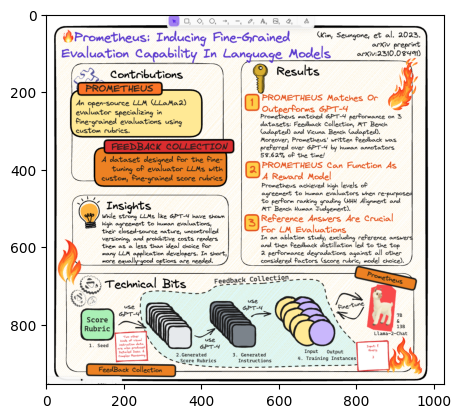
from llama_index.core import SimpleDirectoryReader
from llama_index.multi_modal_llms.anthropic import AnthropicMultiModal

image_documents = SimpleDirectoryReader(input_files=["prometheus_paper_card.png"]).load_data()

# Initiated Anthropic MultiModal class
anthropic_mm_llm = AnthropicMultiModal(max_tokens=300)
response = anthropic_mm_llm.complete(
prompt="Describe the images as an alternative text",
image_documents=image_documents,
)print(response)The image is a diagram titled "Prometheus: Inducing Fine-Grained Evaluation Capability In Language Models". It outlines the key components and workflow of the Prometheus system.
The main sections are:
1. Contributions: Describes Prometheus as an open-source LLM evaluator that uses custom rubrics for fine-grained evaluations.
2. Feedback Collection: A dataset for fine-tuning evaluator LLMs with custom, fine-grained score rubrics. This section visually shows the process of seeding score rubrics, generating scores, generating instructions, and outputting training instances to create the Feedback Collection.
3. Results: Lists 3 key results - Prometheus matches or outperforms GPT-4 on 3 evaluation datasets, can function as a reward model to help LLMs achieve high agreement with human evaluators on ranking, and enables reference answers for LM evaluations via an ablation study and feedback distillation.
4. Insights: Notes that strong LLMs like GPT-4 show high agreement with human evaluations, but their closed-source nature and uncontrolled variations render them a less than ideal choice for many LLM application developers compared to an equally-good open-source option.
5. Technical Bits: Provides a citation to the full paper with more technical details.
The diagram usesUse AnthropicMultiModal to reason images from URLs
from io import BytesIO

import matplotlib.pyplot as plt
import requests
from PIL import Image

image_urls = [
    "https://venturebeat.com/wp-content/uploads/2024/03/Screenshot-2024-03-04-at-12.49.41%E2%80%AFAM.png",
]

img_response = requests.get(image_urls[0], timeout=30)
img = Image.open(BytesIO(img_response.content))
plt.imshow(img)
Load images with url
from llama_index.core.multi_modal_llms.generic_utils import load_image_urls

image_url_documents = load_image_urls(image_urls)
response = anthropic_mm_llm.complete(
prompt="Describe the images as an alternative text",
image_documents=image_url_documents,
)print(response)The image shows a table comparing the benchmark scores of various Claude 3 AI models (Opus, Sonnet, Haiku) against GPT-4, GPT-3.5, and two versions of Gemini (1.0 Ultra and 1.0 Pro) across different academic subjects and tests.
The subjects covered include undergraduate and graduate level knowledge, grade school math, math problem-solving, multilingual math, code, reasoning over text, mixed evaluations, knowledge Q&A, and common knowledge.
The scores are presented as percentages, except for the "Reasoning over text" row which shows raw scores out of a certain number of shots.
Overall, the Claude 3 models show competitive performance compared to the GPT and Gemini models across most of the benchmarks. The Gemini models have a slight edge in some categories like undergraduate knowledge and math problem-solving.Structured Output Parsing from an Image
Here, we use our multi-modal Pydantic program to generate structured output from an image.
from llama_index.core import SimpleDirectoryReader

image_documents = SimpleDirectoryReader(input_files=["ark_email_sample.png"]).load_data()
import matplotlib.pyplot as plt
from PIL import Image
img = Image.open("ark_email_sample.png")
plt.imshow(img)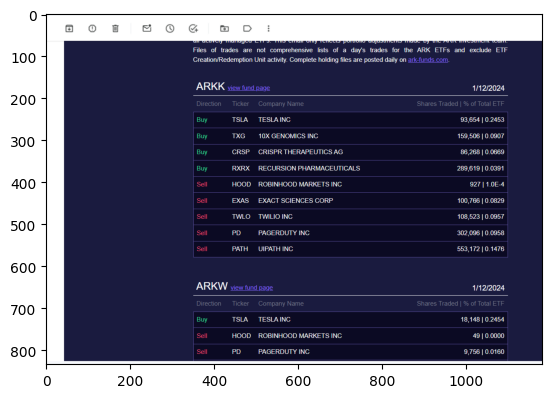
from pydantic import BaseModel


class TickerInfo(BaseModel):
    """List of ticker info."""

    direction: str
    ticker: str
    company: str
    shares_traded: int
    percent_of_total_etf: float


class TickerList(BaseModel):
    """List of stock tickers."""

    fund: str
    tickers: list[TickerInfo]
from llama_index.core.program import MultiModalLLMCompletionProgram
from llama_index.multi_modal_llms.anthropic import AnthropicMultiModal
prompt_template_str = """\
Can you get the stock information in the image \
and return the answer? Pick just one fund.
Make sure the answer is a JSON format corresponding to a Pydantic schema. The Pydantic schema is given below.
"""
# Initiated Anthropic MultiModal class
anthropic_mm_llm = AnthropicMultiModal(max_tokens=300)
llm_program = MultiModalLLMCompletionProgram.from_defaults(
output_cls=TickerList,
image_documents=image_documents,
prompt_template_str=prompt_template_str,
multi_modal_llm=anthropic_mm_llm,
verbose=True,
)response = llm_program()> Raw output: {
"fund": "ARKK",
"tickers": [
{
"direction": "Buy",
"ticker": "TSLA",
"company": "TESLA INC",
"shares_traded": 93664,
"percent_of_total_etf": 0.2453
}
]
}
print(response)fund='ARKK' tickers=[TickerInfo(direction='Buy', ticker='TSLA', company='TESLA INC', shares_traded=93664, percent_of_total_etf=0.2453)]