import os
import sys
from pathlib import Path

# Add parent directory to path for imports
sys.path.insert(0, str(Path.cwd().parent))


from anthropic import Anthropic
from dotenv import load_dotenv

# Import our file utilities
from file_utils import (
    download_all_files,
    extract_file_ids,
    get_file_info,
    print_download_summary,
)

# Load environment variables from parent directory
load_dotenv(Path.cwd().parent / ".env")

API_KEY = os.getenv("ANTHROPIC_API_KEY")
MODEL = os.getenv("ANTHROPIC_MODEL", "claude-sonnet-4-6")

if not API_KEY:
    raise ValueError(
        "ANTHROPIC_API_KEY not found. Copy ../.env.example to ../.env and add your API key."
    )

# Initialize client
# Note: We'll add beta headers per-request when using Skills
client = Anthropic(api_key=API_KEY)

# Create outputs directory if it doesn't exist
OUTPUT_DIR = Path.cwd().parent / "outputs"
OUTPUT_DIR.mkdir(exist_ok=True)

print("✓ API key loaded")
print(f"✓ Using model: {MODEL}")
print(f"✓ Output directory: {OUTPUT_DIR}")
print("\n📝 Note: Beta headers will be added per-request when using Skills")Introduction to Claude SkillsLearn how to use Claude’s Skills feature to create professional documents, analyze data, and automate business workflows with Excel, PowerPoint, and PDF generation.> See it in action: The Skills you’ll learn about power Claude’s file creation capabilities! Check out Claude Creates Files to see how these Skills enable Claude to create and edit documents directly in Claude.ai.
Table of Contents
2. Understanding Skills {#understanding}### What are Skills?Skills are organized packages of instructions, executable code, and resources that give Claude specialized capabilities for specific tasks. Think of them as “expertise packages” that Claude can discover and load dynamically.📖 Read our engineering blog post on Equipping agents for the real world with Skills### Why Skills MatterAfter learning about MCPs (Model Context Protocol) and tools, you might wonder why Skills are important:- Skills are higher-level than individual tools - they combine instructions, code, and resources- Skills are composable - multiple skills work together seamlessly- Skills are efficient - progressive disclosure means you only pay for what you use- Skills include proven code - helper scripts that work reliably, saving time and reducing errors### Key Benefits- Expert-level Performance: Deliver professional results without the learning curve- Proven Helper Scripts: Skills contain tested, working code that Claude can use immediately- Organizational Knowledge: Package company workflows and best practices- Cost Efficiency: Progressive disclosure minimizes token usage- Reliability: Pre-tested scripts mean fewer errors and consistent results- Time Savings: Claude uses existing solutions instead of generating code from scratch- Composable: Multiple skills work together for complex workflows### Progressive Disclosure ArchitectureSkills use a three-tier loading model: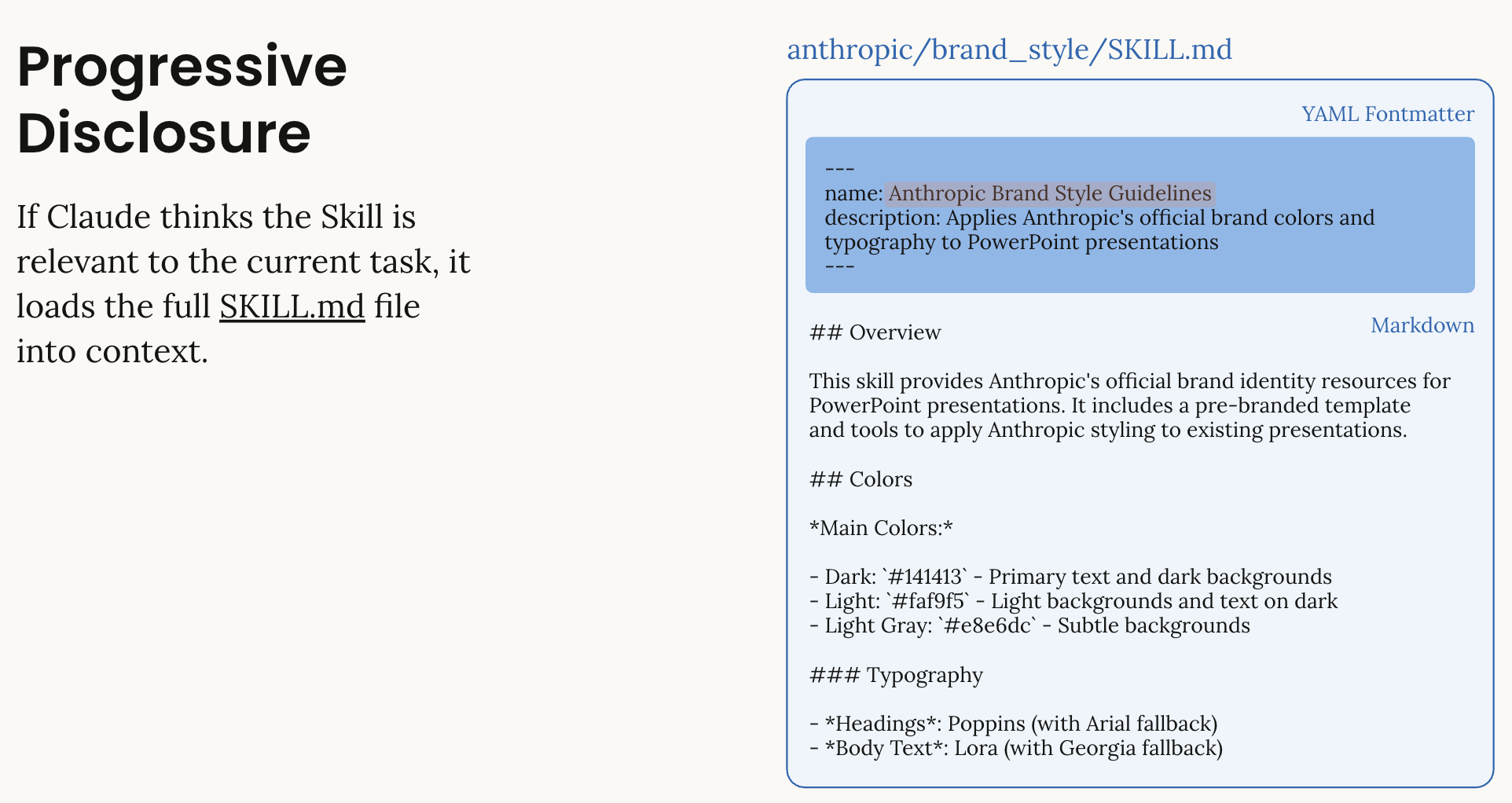 1. Metadata (name: 64 chars, description: 1024 chars): Claude sees skill name and description2. Full Instructions (<5k tokens): Loaded when skill is relevant3. Linked Files: Additional resources loaded only if needed
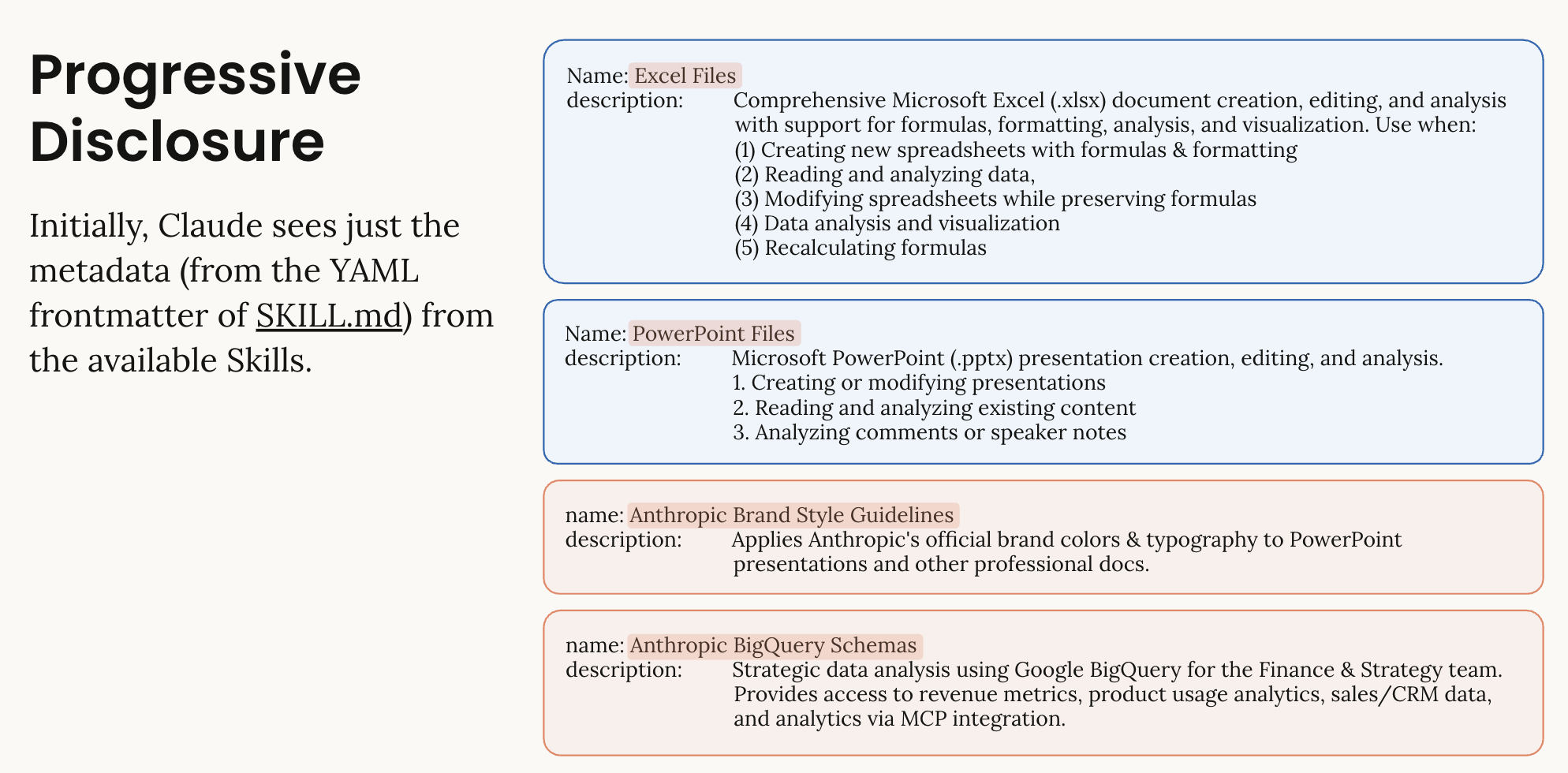 This keeps operations efficient while providing deep expertise on demand. Initially, Claude sees just the metadata from the YAML frontmatter of SKILL.md. Only when a skill is relevant does Claude load the full contents, including any helper scripts and resources.### Skill Types| Type | Description | Example ||——|————-|———-|| Anthropic-Managed | Pre-built skills maintained by Anthropic |
 xlsx, pptx, pdf, docx || Custom | User-defined skills for specific workflows | Brand guidelines, financial models |
Skills Conceptual Overview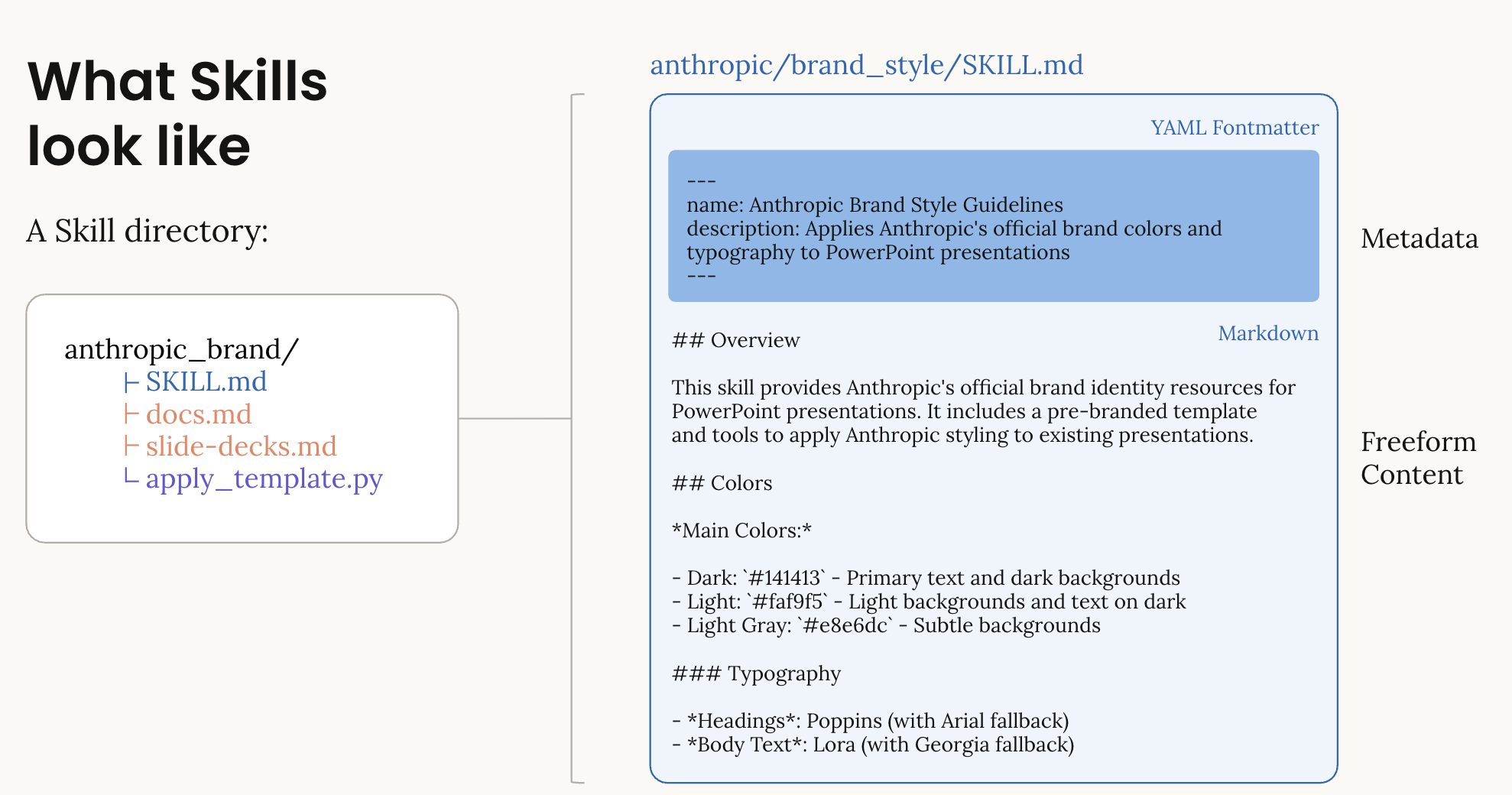 This diagram illustrates:- Skill Directory Structure: How Skills are organized with SKILL.md and supporting files- YAML Frontmatter: The metadata that Claude sees initially- Progressive Loading: How Skills are discovered and loaded on-demand- Composability: Multiple Skills working together in a single request
How Skills Work with Code Execution
Skills require the code execution tool to be enabled. Here’s the typical workflow:
# Use client.beta.messages.create() for Skills support
response = client.beta.messages.create(
    model="claude-sonnet-4-6",
    max_tokens=4096,
    container={
        "skills": [
            {"type": "anthropic", "skill_id": "xlsx", "version": "latest"}
        ]
    },
    tools=[{"type": "code_execution_20250825", "name": "code_execution"}],
    messages=[{"role": "user", "content": "Create an Excel file..."}],
    # Use betas parameter instead of extra_headers
    betas=["code-execution-2025-08-25", "files-api-2025-04-14", "skills-2025-10-02"]
)
What happens: 1. Claude receives your request with the xlsx skill loaded 2. Claude uses code execution to create the file 3. The response includes a file_id for the created file 4. You use the Files API to download the file
Important: Beta API - Use client.beta.messages.create() (not client.messages.create()) - The container parameter is only available in the beta API - Use the betas parameter to enable beta features: - code-execution-2025-08-25 - Enables code execution - files-api-2025-04-14 - Required for downloading files - skills-2025-10-02 - Enables Skills feature
⚠️ Note: When using Skills, you MUST include the code_execution tool in your request.
Token Usage Optimization
Skills dramatically reduce token usage compared to providing instructions in prompts:
| Approach | Token Cost | Performance |
|---|---|---|
| Manual instructions | 5,000-10,000 tokens/request | Variable quality |
| Skills (metadata only) | Minimal (just name/description) | Expert-level |
| Skills (full load) | ~5,000 tokens when skill is used | Expert-level |
The Big Win: You can pack multiple skills into your prompt without bloating it. Each skill only costs you the metadata (name + description) until you actually use it.
Example: Creating an Excel file with formatting - Without Skills: ~8,000 tokens to explain all Excel features upfront - With Skills: Minimal metadata overhead initially, ~5,000 tokens only when Excel skill is invoked - Key Insight: The 98% savings applies to the initial context. Once you use a skill, the full instructions are loaded.
Additional Benefits: - Skills contain helper scripts that are known to work, improving reliability - Claude saves time by using proven code patterns instead of generating from scratch - You get more consistent, professional results
⏱️ Expected Generation Times
⚠️ IMPORTANT: Document generation with Skills requires code execution and file creation, which takes time. Be patient and let cells complete.
Observed generation times: - Excel files: ~2 minutes (with charts and formatting) - PowerPoint presentations: ~1-2 minutes (simple 2-slide presentations with charts) - PDF documents: ~40-60 seconds (simple documents)
What to expect: - The cell will show [*] while running - You may see “Executing…” status for 1-2 minutes - Do not interrupt the cell - let it complete fully
💡 Recommendations: 1. Start simple: Begin with minimal examples to verify your setup 2. Gradually increase complexity: Add features incrementally 3. Be patient: Operations typically take 40 seconds to 2 minutes 4. Note: Very complex documents may take longer - keep examples focused
3. Discovering Available Skills
List All Built-in Skills
Let’s discover what Anthropic-managed skills are available:
# List all available Anthropic skills
# Note: Skills API requires the skills beta header
client_with_skills_beta = Anthropic(
    api_key=API_KEY, default_headers={"anthropic-beta": "skills-2025-10-02"}
)

skills_response = client_with_skills_beta.beta.skills.list(source="anthropic")

print("Available Anthropic-Managed Skills:")
print("=" * 80)

for skill in skills_response.data:
    print(f"\n📦 Skill ID: {skill.id}")
    print(f"   Title: {skill.display_title}")
    print(f"   Latest Version: {skill.latest_version}")
    print(f"   Created: {skill.created_at}")

    # Get version details
    try:
        version_info = client_with_skills_beta.beta.skills.versions.retrieve(
            skill_id=skill.id, version=skill.latest_version
        )
        print(f"   Name: {version_info.name}")
        print(f"   Description: {version_info.description}")
    except Exception as e:
        print(f"   (Unable to fetch version details: {e})")

print(f"\n\n✓ Found {len(skills_response.data)} Anthropic-managed skills")
Understanding Skill Metadata
Each skill has: - skill_id: Unique identifier (e.g., “xlsx”, “pptx”) - version: Version number or “latest” - name: Human-readable name - description: What the skill does - directory: Skill’s folder structure
Versioning Strategy
- Use
"latest"for Anthropic skills (recommended) - Anthropic updates skills automatically
- Pin specific versions for production stability
- Custom skills use epoch timestamps for versions
Example: Monthly Budget Spreadsheet
We’ll start with two examples - a simple one-liner and a detailed request.
Simple Example (1-2 lines)
First, let’s see how Skills work with a minimal prompt:
# Simple prompt - Skills handle the complexity
prompt = "Create a quarterly sales report Excel file with revenue data and a chart"
Detailed Example
For more control, you can provide specific requirements: - Income and expense categories - Formulas for totals - Basic formatting
Example: Monthly Budget Spreadsheet
We’ll create a simple budget spreadsheet with: - Income and expense categories - Formulas for totals - Basic formatting
⏱️ Note: Excel generation typically takes 1-2 minutes (with charts and formatting). The cell will show [*] while running - be patient!
# Create an Excel budget spreadsheet
excel_response = client.beta.messages.create(  # Note: Using beta.messages for Skills support
    model=MODEL,
    max_tokens=4096,
    container={"skills": [{"type": "anthropic", "skill_id": "xlsx", "version": "latest"}]},
    tools=[{"type": "code_execution_20250825", "name": "code_execution"}],
    messages=[
        {
            "role": "user",
            "content": """Create a monthly budget Excel spreadsheet with the following:

Income:
- Salary: $5,000
- Freelance: $1,200
- Investments: $300

Expenses:
- Rent: $1,500
- Utilities: $200
- Groceries: $600
- Transportation: $300
- Entertainment: $400
- Savings: $1,000

Include:
1. Formulas to calculate total income and total expenses
2. A formula for net savings (income - expenses)
3. Format currency values properly
4. Add a simple column chart showing income vs expenses
5. Use professional formatting with headers
""",
        }
    ],
    # Use betas parameter for beta features
    betas=["code-execution-2025-08-25", "files-api-2025-04-14", "skills-2025-10-02"],
)

print("Excel Response:")
print("=" * 80)
for content in excel_response.content:
    if content.type == "text":
        print(content.text)
    elif content.type == "tool_use":
        print(f"\n🔧 Tool: {content.name}")
        if hasattr(content, "input"):
            print(f"   Input preview: {str(content.input)[:200]}...")

print("\n\n📊 Token Usage:")
print(f"   Input: {excel_response.usage.input_tokens}")
print(f"   Output: {excel_response.usage.output_tokens}")
Download the Excel File
Now let’s extract the file_id and download the generated Excel file:
# Extract file IDs from the response
file_ids = extract_file_ids(excel_response)

if file_ids:
    print(f"✓ Found {len(file_ids)} file(s)\n")

    # Download all files
    results = download_all_files(
        client, excel_response, output_dir=str(OUTPUT_DIR), prefix="budget_"
    )

    # Print summary
    print_download_summary(results)

    # Show file details
    for file_id in file_ids:
        info = get_file_info(client, file_id)
        if info:
            print("\n📄 File Details:")
            print(f"   Filename: {info['filename']}")
            print(f"   Size: {info['size'] / 1024:.1f} KB")
            print(f"   Created: {info['created_at']}")
else:
    print("❌ No files found in response")
    print("\nDebug: Response content types:")
    for i, content in enumerate(excel_response.content):
        print(f"  {i}. {content.type}")
✨ What just happened?
- Claude used the
xlsxskill to create a professional Excel file - The skill handled all Excel-specific formatting and formulas
- The file was created in Claude’s code execution environment
- We extracted the
file_idfrom the response - We downloaded the file using the Files API
- The file is now saved in
outputs/budget_*.xlsx
Open the file in Excel to see the results!
5. Quick Start: PowerPoint
Now let’s create a PowerPoint presentation using the pptx skill.
Example: Revenue Presentation
Simple Example (1 line)
# Minimal prompt - let Skills handle the details
prompt = "Create an executive summary presentation with 3 slides about Q3 results"
Detailed Example
Note: This is intentionally kept simple (2 slides, 1 chart) to minimize generation time and demonstrate the core functionality.
Example: Simple Revenue Presentation
Note: This is intentionally kept simple (2 slides, 1 chart) to minimize generation time and demonstrate the core functionality.
# Create a PowerPoint presentation
pptx_response = client.beta.messages.create(
    model=MODEL,
    max_tokens=4096,
    container={"skills": [{"type": "anthropic", "skill_id": "pptx", "version": "latest"}]},
    tools=[{"type": "code_execution_20250825", "name": "code_execution"}],
    messages=[
        {
            "role": "user",
            "content": """Create a simple 2-slide PowerPoint presentation:

Slide 1: Title slide
- Title: "Q3 2025 Results"
- Subtitle: "Acme Corporation"

Slide 2: Revenue Overview
- Title: "Quarterly Revenue"
- Add a simple column chart showing:
  - Q1: $12M
  - Q2: $13M
  - Q3: $14M

Use clean, professional formatting.
""",
        }
    ],
    betas=["code-execution-2025-08-25", "files-api-2025-04-14", "skills-2025-10-02"],
)

print("PowerPoint Response:")
print("=" * 80)
for content in pptx_response.content:
    if content.type == "text":
        print(content.text)

print("\n\n📊 Token Usage:")
print(f"   Input: {pptx_response.usage.input_tokens}")
print(f"   Output: {pptx_response.usage.output_tokens}")
Download the PowerPoint File
# Download the PowerPoint file
file_ids = extract_file_ids(pptx_response)

if file_ids:
    results = download_all_files(
        client, pptx_response, output_dir=str(OUTPUT_DIR), prefix="q3_review_"
    )

    print_download_summary(results)

    print("\n✅ Open the presentation in PowerPoint or Google Slides to view!")
else:
    print("❌ No files found in response")
⏱️ Note: PDF generation typically takes 1-2 minutes for simple documents. The cell will show [*] while running - be patient!
Example: PDF Documents
Simple Example (1 line)
# Quick PDF generation
prompt = "Create a professional invoice PDF for $500 consulting services"
Detailed Example: Receipt
Note: This is intentionally kept simple to ensure clean formatting.
Example: Simple Receipt
Note: This is intentionally kept simple to ensure clean formatting.
# Create a PDF receipt
pdf_response = client.beta.messages.create(
    model=MODEL,
    max_tokens=4096,
    container={"skills": [{"type": "anthropic", "skill_id": "pdf", "version": "latest"}]},
    tools=[{"type": "code_execution_20250825", "name": "code_execution"}],
    messages=[
        {
            "role": "user",
            "content": """Create a simple receipt PDF:

RECEIPT

Acme Corporation
Date: January 15, 2025
Receipt #: RCT-2025-001

Customer: Jane Smith

Items:
- Product A: $50.00
- Product B: $75.00
- Product C: $25.00

Subtotal: $150.00
Tax (8%): $12.00
Total: $162.00

Thank you for your business!

Use simple, clean formatting with clear sections.
""",
        }
    ],
    betas=["code-execution-2025-08-25", "files-api-2025-04-14", "skills-2025-10-02"],
)

print("PDF Response:")
print("=" * 80)
for content in pdf_response.content:
    if content.type == "text":
        print(content.text)

print("\n\n📊 Token Usage:")
print(f"   Input: {pdf_response.usage.input_tokens}")
print(f"   Output: {pdf_response.usage.output_tokens}")
Download and Verify the PDF
# Download the PDF file
file_ids = extract_file_ids(pdf_response)

if file_ids:
    results = download_all_files(
        client, pdf_response, output_dir=str(OUTPUT_DIR), prefix="receipt_"
    )

    print_download_summary(results)

    # Verify PDF integrity
    for result in results:
        if result["success"]:
            file_path = result["output_path"]
            file_size = result["size"]

            # Basic PDF validation
            with open(file_path, "rb") as f:
                header = f.read(5)
                if header == b"%PDF-":
                    print(f"\n✅ PDF file is valid: {file_path}")
                    print(f"   File size: {file_size / 1024:.1f} KB")
                else:
                    print(f"\n⚠️ File may not be a valid PDF: {file_path}")
else:
    print("❌ No files found in response")
7. Troubleshooting
Common Issues and Solutions
Issue 1: API Key Not Found
Error:
ValueError: ANTHROPIC_API_KEY not foundSolution: 1. Ensure .env file exists in the parent directory 2. Check that ANTHROPIC_API_KEY=sk-ant-api03-... is set 3. Restart the Jupyter kernel after creating/editing .env
Issue 2: Container Parameter Not Recognized
Error:
TypeError: Messages.create() got an unexpected keyword argument 'container'Solution: Use client.beta.messages.create() instead of client.messages.create():
# ✅ Correct - use beta.messages
response = client.beta.messages.create(
    model=MODEL,
    container={"skills": [...]},
    tools=[{"type": "code_execution_20250825", "name": "code_execution"}],
    messages=[...],
    betas=["code-execution-2025-08-25", "files-api-2025-04-14", "skills-2025-10-02"]
)

# ❌ Incorrect - regular messages doesn't support container
response = client.messages.create(
    model=MODEL,
    container={"skills": [...]},  # Error!
    messages=[...]
)
Issue 3: Skills Beta Requires Code Execution Tool
Error:
BadRequestError: Skills beta requires the code_execution tool to be included in the request.Solution: When using Skills, you MUST include the code_execution tool:
# ✅ Correct
response = client.beta.messages.create(
    model=MODEL,
    tools=[{"type": "code_execution_20250825", "name": "code_execution"}],
    messages=[...],
    betas=["...", "skills-2025-10-02"]
)

# ❌ Incorrect - missing code_execution tool
response = client.beta.messages.create(
    model=MODEL,
    messages=[...],
    betas=["...", "skills-2025-10-02"]
)
Issue 4: No Files Found in Response
Error:
❌ No files found in responseSolution: 1. Check that code execution tool is included in the request 2. Verify the skill was loaded (check response content) 3. Ensure the task actually requires file creation 4. Look for error messages in the response text
Issue 5: File Download Failed
Error:
Error retrieving file: File not foundSolution: 1. Files may have a limited lifetime on Anthropic’s servers 2. Download files immediately after creation 3. Check file_id is correctly extracted from response 4. Verify Files API beta is included in betas list
Token Optimization Tips
- Use “latest” version for Anthropic skills - automatically optimized
- Batch operations - Create multiple files in one conversation when possible
- Reuse containers - Use
container.idfrom previous responses to avoid reloading skills - Be specific - Clear instructions mean fewer iterations
API Rate Limiting
If you encounter rate limits: - Implement exponential backoff for retries - Use batch processing for multiple files - Consider upgrading your API tier for higher limits